SAZ Best settings and sensitivity guide | Every option shown with in-game screenshots
SettingsAdmin
#settings
#sensitivity
#FOV
#crosshair
Sudden Attack Zero Point (SAZ) is a highly competitive 5v5 FPS, so your settings should prioritize frame rate and visibility over graphical fidelity. This article walks through every settings option one by one with screenshots taken from the Final CBT client, along with workarounds for known issues and how to think about sensitivity.
Note that the screenshots below were taken with the game's Japanese UI. To make it easy to match this article against what is on your screen, each setting name is given in English with the Japanese UI label alongside it.
If you are unsure whether your PC is up to spec, read System requirements and recommended specs first. That article covers the latest information on minimum requirements and recommended specs.
Recommended in-game settings (with screenshots)
We went through every settings screen in the Final CBT client. Settings are split across five tabs: Display (ディスプレイ), Audio (オーディオ), Control (コントロール), Key Settings (キー設定) and Interface (インターフェース). Below are the values we actually use, with an explanation for each.
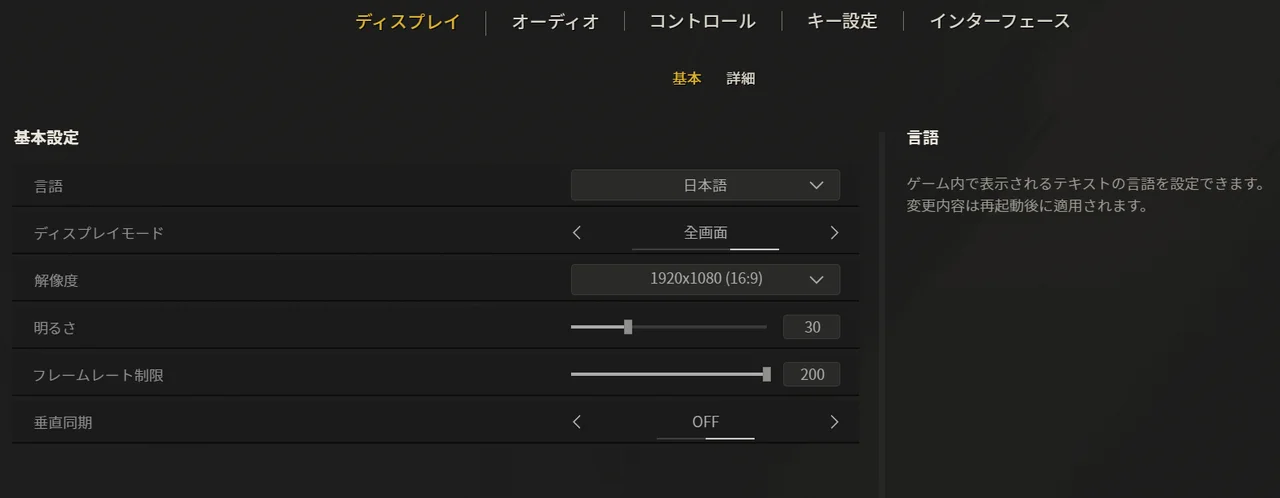
Display settings (basic)
Setting
Recommended
Notes
Language (言語)
English (or whichever language you read)
The game must be restarted after changing this (it will not switch until you restart)
Display Mode (ディスプレイモード)
Fullscreen (全画面)
Other FPS titles widely report lower latency in fullscreen, so it is the safe pick. It also avoids the known borderless-window issues (covered below)
Resolution (解像度)
1920x1080 (native)
Visibility comes first. Keep your monitor's native resolution
Brightness (明るさ)
30 (default) is enough
MAX was the standard recommendation in the original Sudden Attack, but in SAZ pushing it too high risks blown-out highlights. Only raise it a little if you play in an extremely dark room
Frame Rate Limit (フレームレート制限)
200 (max)
SAZ caps out at 200 FPS. If your monitor supports it, 200 is strongly recommended. The setting's lower bound is 80, and on a 60Hz monitor holding it around 80 puts less load on your PC
Vertical Sync (垂直同期)
OFF
As with other FPS titles, turn it off to reduce input latency
Display settings (advanced)
Setting
Recommended
Notes
FOV
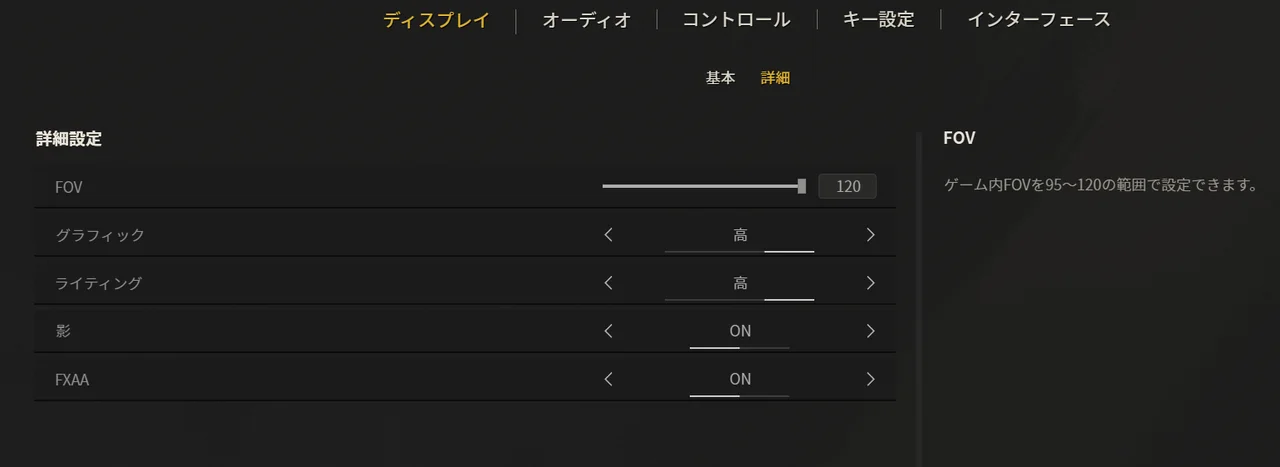
120 (max)
Anything below 120 narrows the area in which you can spot enemies. Lowering it to gain fps on a low-spec PC is an option, but not recommended
Graphics (グラフィック)
High (高) (Medium if it struggles)
If your frame rate holds, higher is better. If it drops, Medium is plenty
Lighting (ライティング)
High (高)
The higher it is, the easier enemies are to see, so raising it is recommended
Shadows (影)
ON
Shadows cast by enemies behind cover are a real source of information
FXAA
ON
Like Lighting, it improves enemy visibility, so turn it on
Audio settings
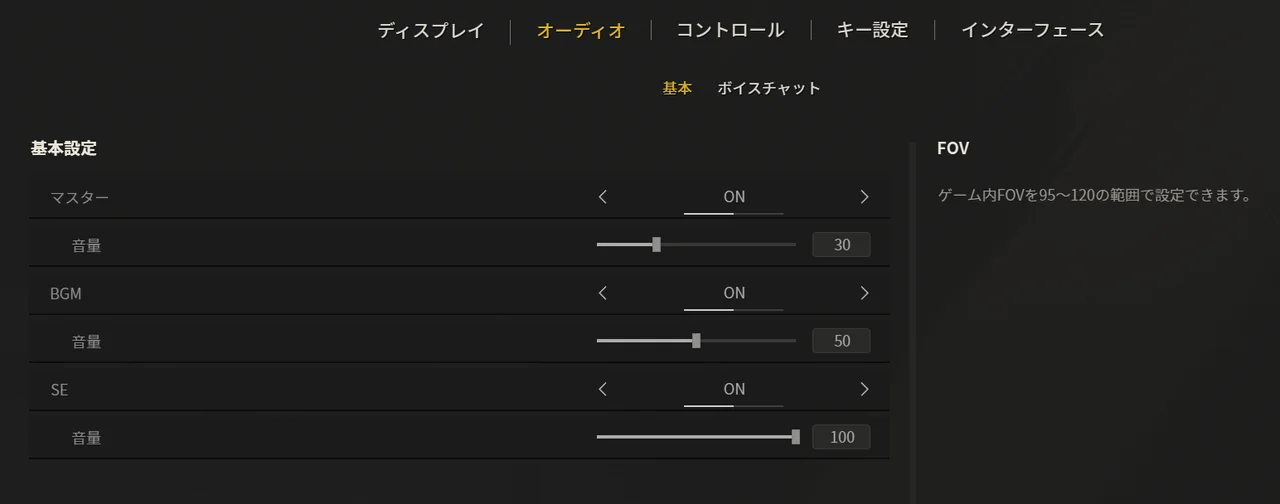
Our recommendation: keep SE pinned at the MAX of 100, set BGM to taste, and adjust overall volume with Master (マスター). Sound effects — footsteps, gunfire, reloads — are this game's single most important source of information, so lock SE at 100, and if everything is too loud, turn down Master (マスター) rather than SE. That way you lower the overall volume without hurting how audible the important effects are (the SE-to-BGM balance). The screenshot shows our settings: SE 100, BGM 50, Master 30.
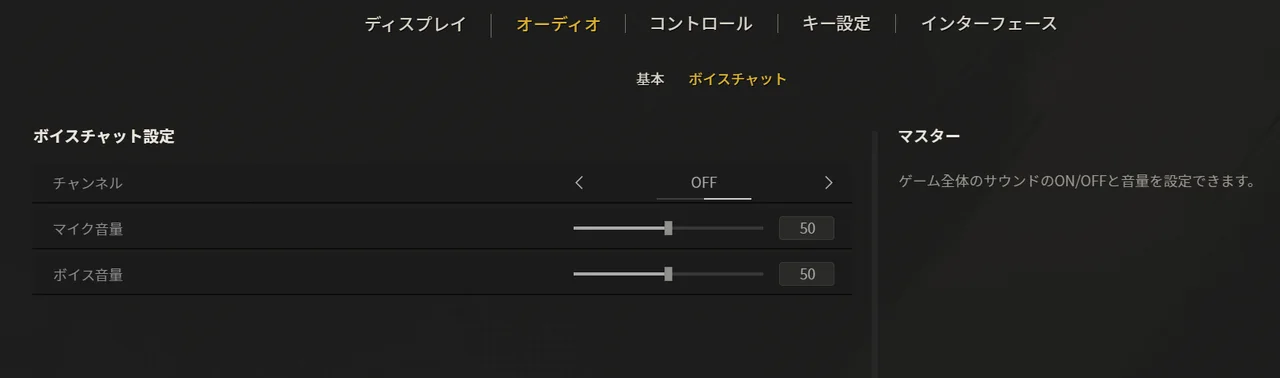
Voice chat is best left OFF for now. Being able to talk even with random teammates could help coordination, but there is no problem starting with it off. Revisiting it once ranked matchmaking ships is about the right level of urgency.
Mouse sensitivity (Control)
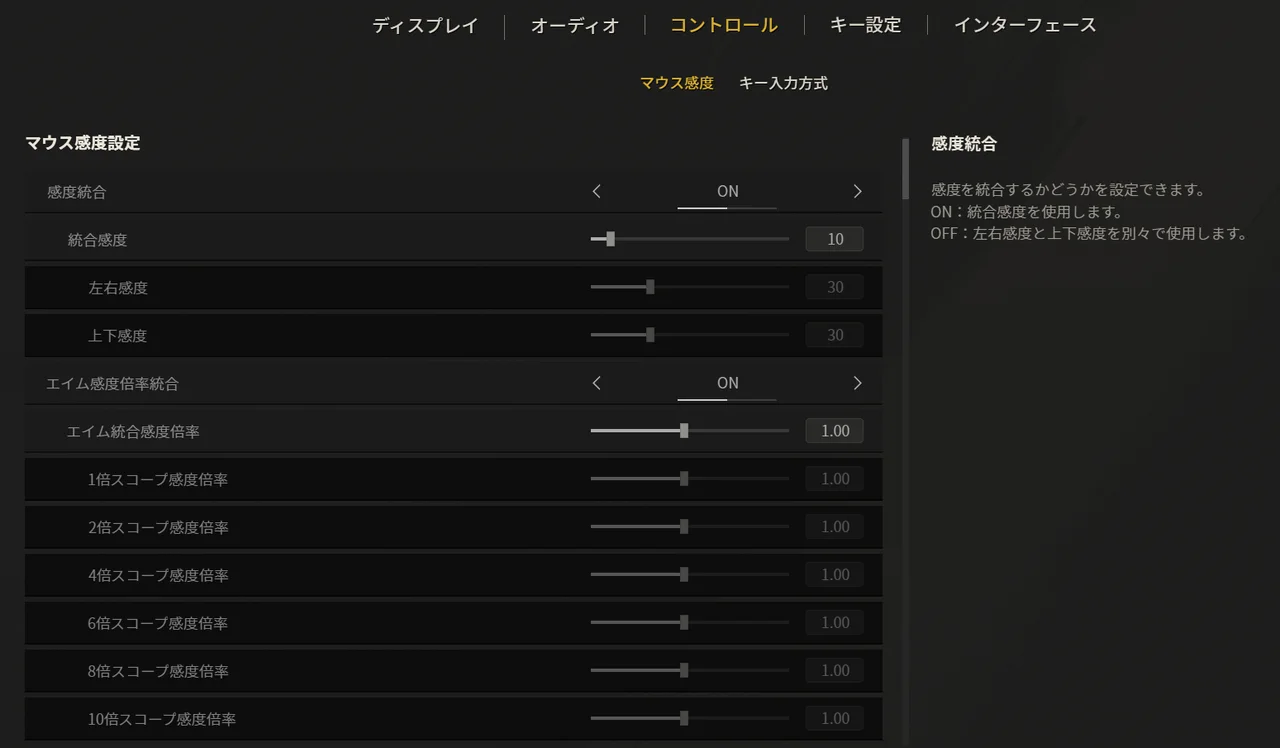
The simplest approach is to turn Unified Sensitivity (感度統合) ON and manage everything with a single value. The sensitivity itself is personal preference, but lower values tend to make your aim more consistent, so unless you are very confident, we recommend going low. Also keep in mind that how sensitivity feels changes with your mouse's DPI, so copying someone else's number will not reproduce their feel (at the same in-game sensitivity, 400 DPI and 800 DPI differ by a factor of two in how far you turn).
For the Aim Sensitivity Multiplier (エイム感度倍率, scope sensitivity), 1.00 is our recommendation. It matches your hipfire sensitivity, so the feel stays consistent and you never have to second-guess it. The 1x through 10x scope multipliers can also be adjusted individually, so if you want to master sniping, fine-tune those later. For how to actually land on a number, see "How to think about sensitivity settings" below.
Key input method (Control)
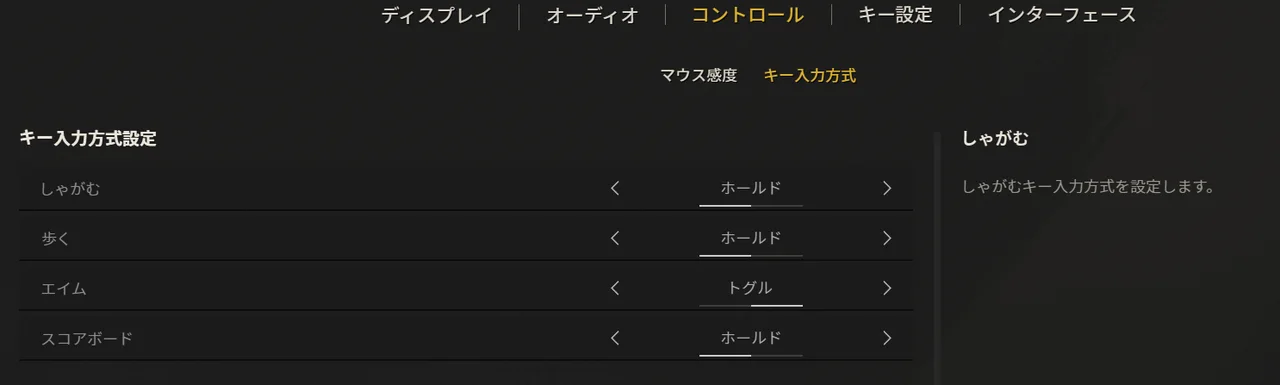
The key input method is fine on defaults. Situations where you hold crouch or walk while moving and aiming at the same time are rare to begin with, and you are usually running while moving and shooting, so hold (active only while pressed) will not cause you trouble.
Setting
Recommended
Notes
Crouch (しゃがむ)
Hold (ホールド, default)
You only use it for a moment in a fight, so hold is enough
Walk (歩く)
Hold (ホールド, default)
Sneaking only needs to be pressed for the moment you use it
Aim (エイム)
Toggle (トグル, default)
Makes holding a scope up much easier
Scoreboard (スコアボード)
Hold (ホールド, default)
Key settings (basic and combat)
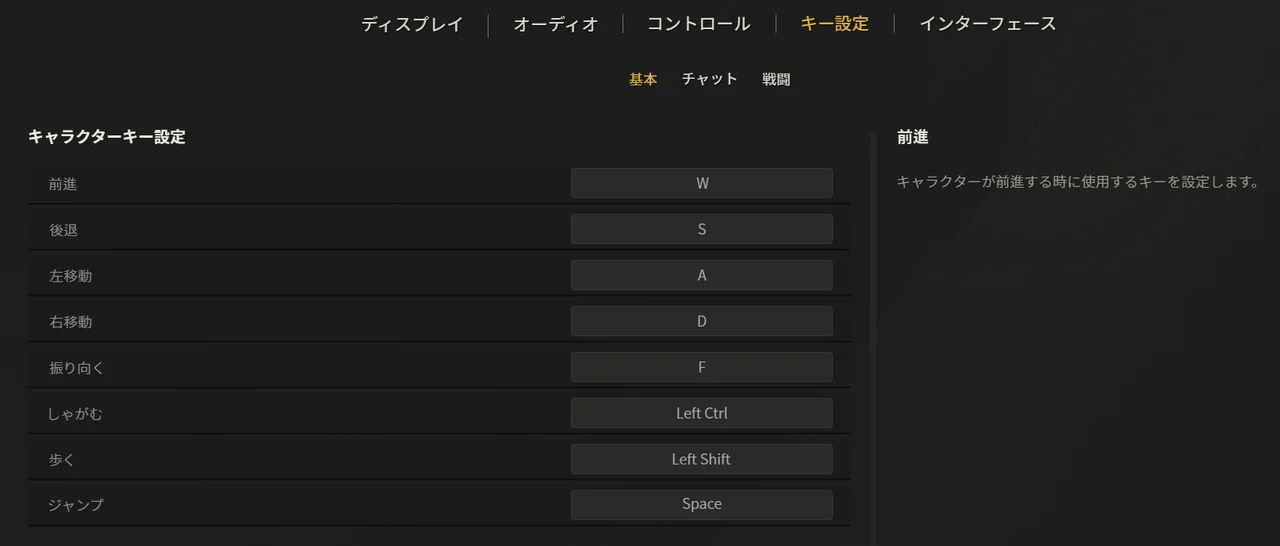
Movement is standard WASD. Turn Around (振り向く) being bound to the F key is a nicely Sudden Attack-flavored touch — it is there for the 180-degree spin when someone gets behind you.
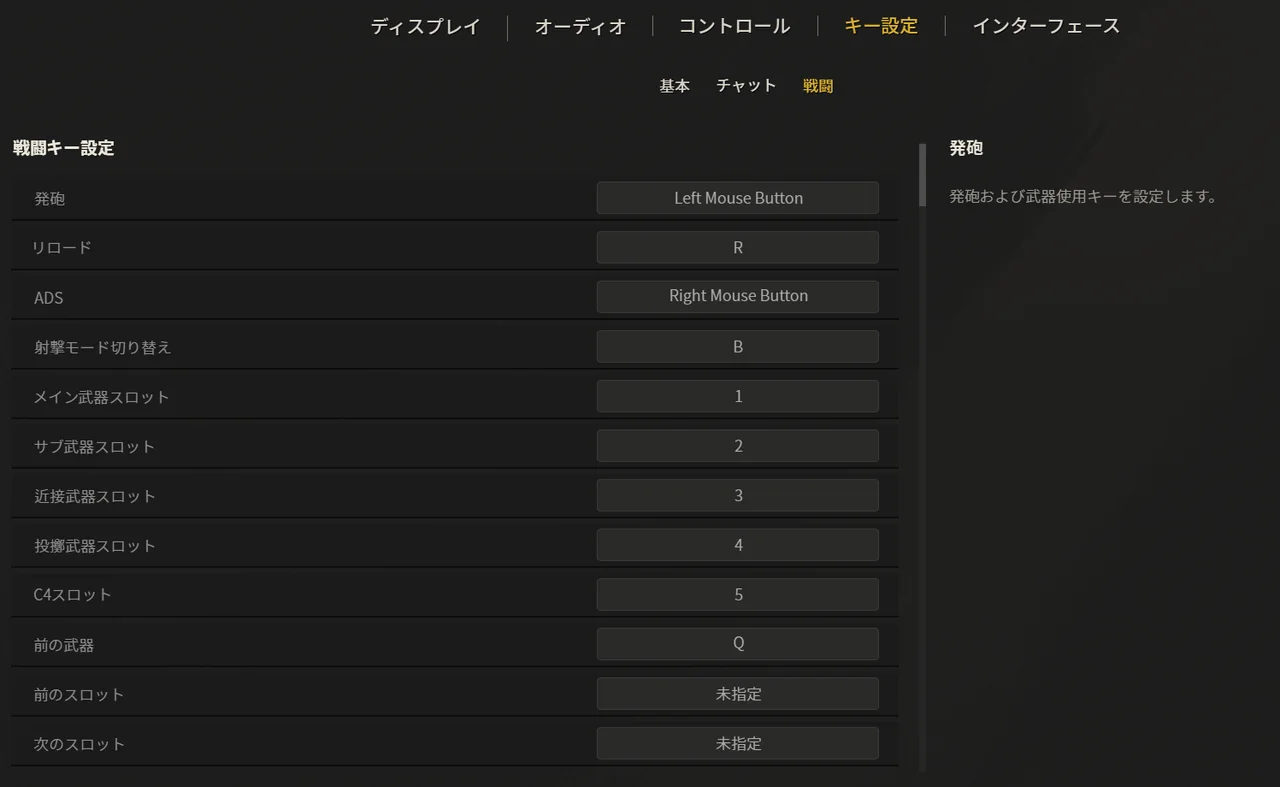
Key bindings are personal preference, but defaults are fine as a base (Fire: left click / ADS: right click / Reload: R / Weapon slots: 1-5).
Worth changing: the Previous Slot (前のスロット) and Next Slot (次のスロット) binds on the mouse wheel by default, plus Previous Weapon (前の武器) on Q, are best set to unassigned (未指定). Switching weapons by pressing 1, 2, 3 directly is clearly faster, and leaving these bound invites accidental weapon swaps mid-fight. The screenshot shows the slot cycling binds removed (we recommend clearing Previous Weapon on Q as well).
Crosshair (Interface)
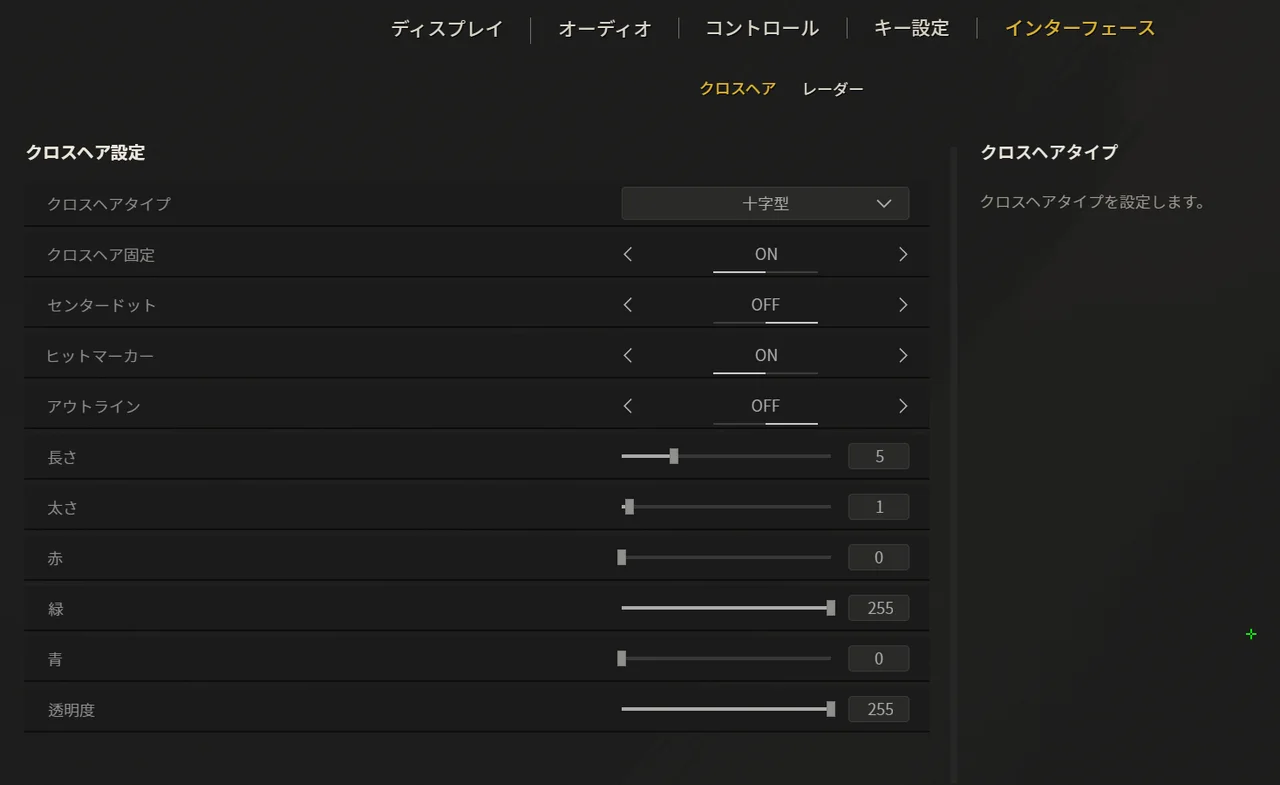
The crosshair is another matter of taste, but a dot and a cross point in different directions. A dot suits tap-firing where the first shot is everything; a cross makes it easier to land shots while controlling recoil. The first shot matters in SAZ too, but recoil control matters even more to how this game plays, so we recommend the cross type (十字型).
Also, always turn Fixed Crosshair (クロスヘア固定) ON. With it off, the crosshair moves every time you move or shoot, which hurts visibility.
Our other settings: Center Dot (センタードット) OFF, Outline (アウトライン) OFF, Length (長さ) 5, Thickness (太さ) 1, green (R0/G255/B0), Opacity (透明度) 255. A small green cross is the classic pick because it does not blend into any map's background. Leaving Hit Marker (ヒットマーカー) ON makes it easier to confirm your damage.
Radar (Interface)
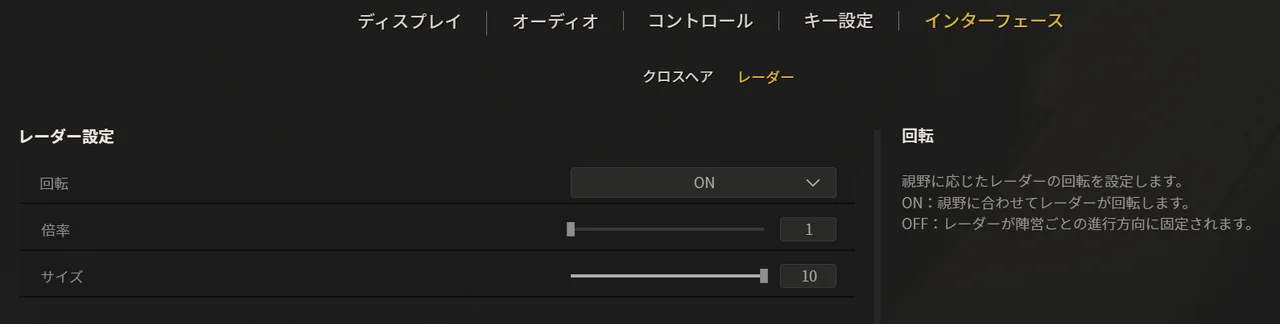
Rotate (回転) ON, Zoom (倍率) 1, Size (サイズ) 10 is our recommendation. Turning Rotate (回転) ON keeps the radar oriented to the direction you are facing, which makes enemy positions intuitive to read. On top of that, Zoom (倍率) 1 (zoomed out) and Size (サイズ) 10 (max) let you take in more of the map, so it is easier to read the next play from teammate positions and gunfire. The radar is your lifeline for finding enemies.
Fullscreen is the recommended display mode
According to the official known-issues announcement, the default display mode on first launch is borderless windowed. However, as covered below, issues with borderless windowed mode and G-SYNC have been reported during the Final CBT, so for now we recommend playing in fullscreen (全画面), which also has an advantage in input latency.
Final CBT known issues and workarounds
An official announcement (Steam news) updated on July 9, 2026 lists known issues and workarounds for the Final CBT. Here are the ones related to settings.
Symptom
Workaround
Frame rate drops with G-SYNC set to "Windowed and Full Screen Mode"
Turn G-SYNC off, or change it to "Full Screen Mode only"
Cannot press the terms-of-service agreement button in borderless windowed mode
Verify the integrity of game files on Steam
Black screen on launch
The developers are investigating the cause
Abnormally high ping (response time)
Leave that match and join a different one
To change the G-SYNC setting, right-click your desktop, open the NVIDIA Control Panel, and go to "Set up G-SYNC" under "Display." In addition, the October 2025 Steam Next Fest demo had reported issues where the game would not launch with certain G-SYNC settings or with AMD FreeSync enabled. If you run into launch trouble, temporarily disabling G-SYNC/FreeSync and trying again is an effective first step.
How to think about sensitivity settings
The finer details of the in-game sensitivity options (such as separate ADS sensitivity settings) are unconfirmed at this point, so we will update this article once they are verified during the CBT. Here we cover how to approach sensitivity tuning based on how SAZ plays.
SAZ is an FPS where the first bullet tends to fly straight and headshots are extremely valuable. Recoil is primarily vertical, and crouching and stopping improve accuracy, so the benchmark for choosing your sensitivity should be whether you can make fine adjustments with your crosshair placed at head height.
Start from the mouse distance needed for a 180-degree turn (roughly 180 to 360 degrees across the full width of your mousepad is a good guideline)
Fix your mouse DPI at 400 to 800 and fine-tune with the in-game sensitivity
SAZ has a Turn Around (振り向く) key (default: F), so 180-degree spins to face behind you can be done with a keypress. Not being able to whip around with the mouse is therefore less of a drawback at low sensitivity — feel free to go low and prioritize aim precision
Once you settle on a value, use it for at least 30 minutes in Practice or Deathmatch (Bot) and avoid changing it frequently
Practice mode and Deathmatch (Bot) were both available in the Final CBT, so check your sensitivity there before jumping into matches against other players. For early practice routines, see the beginner's guide as well.
Summary
For display, the basics are FOV 120, frame rate limit 200 (the cap), Vertical Sync (垂直同期) OFF and Fullscreen (全画面)
Lighting (ライティング) High, FXAA ON and a cross-type crosshair — prioritize visibility
Keep SE pinned at 100 and adjust overall volume with Master (マスター). For the radar, Rotate (回転) ON and Size (サイズ) 10
Go low on sensitivity as a baseline. Fix DPI at 400 to 800 and fine-tune with the in-game sensitivity
Because of the known G-SYNC issues, the safe setup for now is fullscreen with G-SYNC set to Full Screen Mode only
The Final CBT ended on July 13, 2026 at 6:59 PM JST. The next chance to play is Early Access, starting July 30, 2026 (see Release date set for July 30, 2026).